Wednesday, August 29, 2012

Software Releases • HD Contact Photos Donate v8.1.9

HD Contact Photos Donate v8.1.9
Requirements: Android 2.2+
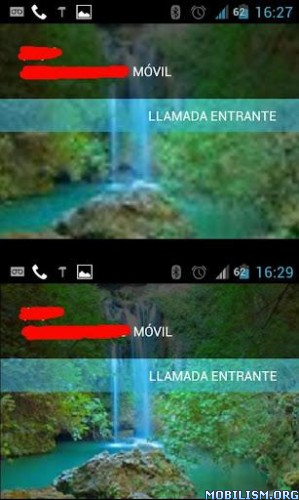
Overview: Native Google contacts app uses a strangely lower resolution (96x96px).
Image


This was normal in the firsts Android versions.

The new phones includes a large amount of memory and a large screens, and also, the new Android version (Ice Cream Sandwitch) predisposes to a better user experience.

But, by default, the contact photos stored in Android 4.0 uses the older resolution (96x96px), and the photo contacts appears pixelated.

With this app you can make a bulk update of your contact photos to a increased resolution (256x256px) that's shows much better in your new devices.

Also, in older devices, that aren't running ICS, the app allows to make a bulk photo contacts update and increase the resolution to the device max supported size.

Finally, if you have rooted your device, you can increase the size of the contact photos to 400x400px (or more). That sounds good in devices with a large screen, like Galaxy Note.

Instructions

1) Place the desired contact photos (in PNG or JPG format) in a folder of your sdcard. I recommend to use square photos.
2) Open the app
3) Click settings and configure the sources folder to the stored photos folder
4) Go main window in the app
5) Select the photos that you want to update
6) Click the update photos button (the photos was automatically resized to the max resolution supported by the device).

* If you want to use photos greater than the maximum supported device size, you need to be rooted. If you're rooted, go
settings, check the "Use HD photos" checkbox then apply the desired photos.

Please, if you have troubles or issues, contact with the developers via email or at the XDA thread.

What's in this version:
- Added ads in free app version (i'm sorry)
- Null pointer exception error solved in prefs (Android 4.1)

More Info:
Software Releases • Launch-X Pro v1.9.8

Launch-X Pro v1.9.8
Requirements: Android 1.6+
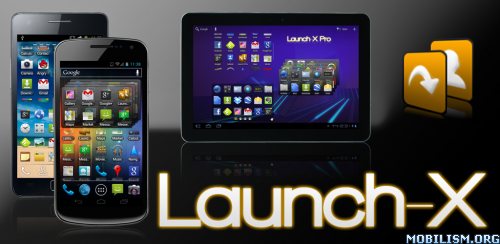
Overview: Launch-X is a powerful widget for your Android homescreen. It features various customizable configurations to allow very quick access to your favorite applications, contacts or generic shortcuts.

Image

With Launch-X you can maximize the usage of your homescreen space. In fact, instead of having the '4 icons on each row' limitation of the stock Launchers, you can put much, much more in the same space!
There are several configurations options available in Launch-X that let you build a widget that best suits your needs. For example, you can create a widget with multiple screens that contains over 40, 50, 100, or more shortcuts! You can even create a scrollable widget in which you can basically put an unlimited number of items!
You can also decide that you prefer not to use the multi-screens feature, and instead keep a more clean single screen with up to 28 items (4 rows, with 7 icons each).

Features:
NEW: Icons packs support use the tons of icons packs already available for ADW Launcher (EX), LauncherPro and GO Launcher (EX).
NEW: Custom icons you can set a custom icon for each item in your Launch-X widget.

Unlimited widgets You can create and configure as many Launch-X widgets as you need.
Widget sizes You can choose between 2x1, 2x2, 2x3, 3x1, 3x2, 4x1, 4x2, 4x3, 4x4, 5x1 (for Tablets), 5x2 (for Tablets) and 5x3 (for Tablets).
Scrollable widgets You can create a scrollable widget, which allows you to have an unlimited number of items in it.
Items The items that can be added to Launch-X are applications, contacts or generic shortcuts. A shortcut for a contact can start a call, send a message or open the contact itself.
Stack widgets Since Android 3.0 a new widget type has been added: Stack Widgets.
Items order You can easily sort your items as you want, with simple drag-and-drop.
Icon size The available sizes for the shortcut icons are "Small", "Medium", "Large" and "X-Large".
Number of icons Each row can have from 1 up to 7 icons.
Number of rows Each widget can have from 1 up to 4 rows.
Screen selection method You can choose to use the arrows buttons to navigate through screens, or the direct buttons (which allow quicker access to the desired screen). You can also select 'None' to have a single screen with more available space.
Show/hide items names The shortcuts names can be shown or hidden.
Background/buttons transparency Select your preferred background and buttons transparency.
Backup/Restore Backup your widgets to the SD card and restore them when needed.

Recent changes
v1.9.8
* Fixed the 'big icons' issue that appeared on some devices (sorry for that!).

v1.9.7
* Fixed widget stuck issues for ICS and JB.
* Improved performance on newer devices (e.g. Samsung Galaxy S3) and fixed various bugs.

v1.9.6
* Over-Scroll Mode
Scrollable Widgets can enable/disable over-scroll. Over-Scroll Mode allows showing the glow effect when you
over-scroll the list.

* New Backgrounds
New widget backgrounds have been added (non-rounded + white frame).

* GO Launcher Themes
Improved support for Go Launcher Themes / Icons Packs.

v1.9.5
* Icons Packs
Launch-X now supports icons packs to make your widgets even more beautiful and customized.
You can download the tons of icons packs already available. Compatible with:
- ADW Launcher (EX) icons packs
- LauncherPro icons packs
- GO Launcher (EX) icons packs

* Custom icons
You can now set a custom icon for each item in your Launch-X widgets.
It is possible to use icons that are inside icons packs, or a gallery picture (+ optional crop).

More Info:

Software Releases • Enhanced Email v1.34.4 build 134400

Enhanced Email v1.34.4 [Update]
Requirements: Android 2.2 and up
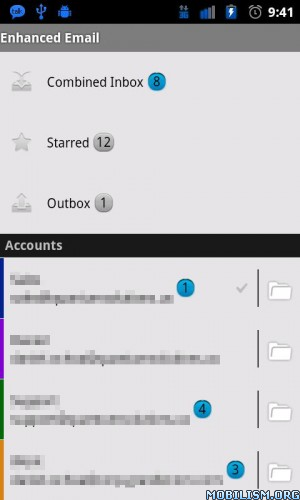
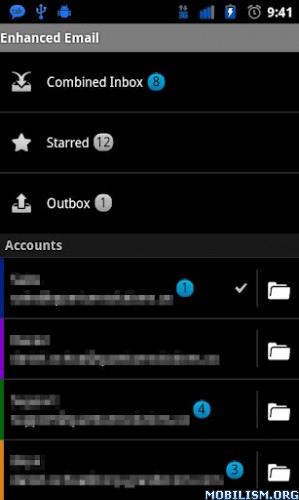
Overview: Enhanced Email is a fully featured but lightweight fast E-Mail client offering support for multiple Exchange/POP/IMAP accounts all in one single app.

Image Image

It integrates with your existing native Contacts & Calendar apps rather than tacking on bloatware.

Enhanced Email is HALF the price of the competition! You'll quickly see this is the e-mail application that can replace ALL others on your phone. Enhanced Email is quickly becoming the app for blackberry users moving to Android or corporate users wanting a faster email solution.

Support for:
* Exchange 2003/2007/2010 SP1 (Activesync only, not Exchange WebServices)
* Zimbra Collaboration Server
* Novell Groupwise Server (Activesync must be running)
* IceWarp Server
* Just about every POP/IMAP server you can think of

Supported on:
* Android 2.2, 2.2.1, 2.3, 2.3.1, 2.3.2, 2.3.3, 2.3.4, 2.3.5
* Android 3.0/3.0.1/3.1/3.2

Other Android apps we have support for:
* Executive Assistant (Be sure and check this app out)

Key features included:
* Full E-Mail search including message text!
* No pin-lock requirement (Exchange)
* Combined Inbox view aggregates mail for all mailboxes into a single location!
* Auto-BCC
* Full HTML inbound/outbound
* PUSH for Mail/Contacts/Calendar --> Exchange only <--
* Ability to sync "ALL" E-mail option (Exchange)
* Unread E-Mail widget
* Allow client certificate selection (Exchange)
* Save any attachment to sdcard
* Use volume controls to increase/decrease font size when viewing a message
* "Select All" messages menu option in mailbox menu
* Ability to hide/unhide folders from view (Exchange)
* Ability to toggle sync for individual folders/sub-folders (Exchange)
* Lots of customizable account options
* Customizable account colors for each account
* Add ability to move single and multiple messages (Exchange/IMAP)
* Shortcut keys to make life easier for people switching from BB
* Ability to select/copy text!
* "Empty Trash" option makes emptying your trash folder 100 times easier/faster

What's in this version:
* Various FC fixes
* Fixed issue where previous/next arrows in the Message view screen were not correctly applying the user's SORT preference
* Fixed issue where previous/next arrows in the Message view screen were not moving to the correct messages while in the Combined Inbox
* Fixed issue where debug logger might cause a FC if left on too long
* Fixed issue where an invalid system date format would cause EE to FC

More Info:

Software Releases • CWMR Touch Installer v1.4.2.1

CWMR Touch Installer v1.4.2.1
Requirements: Android 2.2+
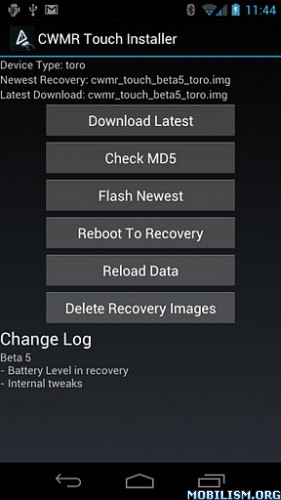
Overview: This is a simplified installer for my touch version of ClockworkMod Recovery that is currently in testing for the Galaxy Nexus. It will download the latest recovery image for you and flash it without the need for fastboot or a PC.

Image

This is a simplified installer for my touch version of ClockworkMod Recovery that is currently in testing for the Galaxy Nexus. It will download the latest recovery image for you and flash it without the need for fastboot or a PC.

Note: This is not the touch edition being built directly by Koush.

Support Devices:
- Galaxy Nexus (LTE/CDMA)
- Galaxy Neuxs (GSM)
- View Sonic GTab w/ 1.2 bootloader

What's in this version:
V 1.4.2.1) Support for all US Samsung Galaxy S III types (Verizon, T-Mobile, AT&T, Sprint)
V 1.4.2) Support for Sprint Galaxy Nexus and Verizon Samsung Galaxy S III

This application does require root.

If you have any questions or problems please first contact: nathan@unstableapps.com

Thanks!

More Info:

Software Releases • mSecure - Password Manager v3.1.7

mSecure - Password Manager v3.1.7
Requirements: Android 1.6+
Overview: mSecure Password Manager and Digital Wallet - Security Everywhere Made Simple
Image

Don’t take any chances with your passwords and private information; keep your data safe and secure with mSecure Password manager!

Imagine your phone is lost or stolen, you can have peace of mind knowing that mSecure has safeguarded your web site logins, bank accounts and credit cards thereby protecting your reputation, identity and finances.

mSecure for iPhone, iPad and iPod Touch is used by almost a million users worldwide, providing the best time-tested, trusted, convenient and secure solution for storing and syncing your important information.

“Best Android Privacy Apps: mSecure Password Manager” – GizmoCrunch

mSecure Password Manager and Digital Wallet - Security Everywhere, Made Simple

ULTRA-SECURE: mSecure uses ultra-secure 256bit blowfish encryption to protect personal information such as account numbers, usernames, passwords and more.

• Auto-lock to protect the app from prying eyes
• Password Generator to create unguessable passwords
• Sync Everywhere™ cloud data protection architecture not dependent on security of cloud service.
• Free backup utility to keep data safe - mBackup
• Auto-Backup creates a backups when changes made
• Email attachment backup/restore for quick backups
• Optional self-destruct if hacker attempts to guess your password

MADE SIMPLE: mSecure is made simple for everyday users with a native Android look and feel with features like:

• Seventeen standard templates for fast data entry with the ability to create custom templates with UNLIMITED fields
• Over 250 icons to personalize your records
• Integrated search, sort, and collapsible section headers
• Full landscape support (optional)
• Groups to categorize your records
• Mark any record as a favorite for fast access
• Sharing of records via email, SMS or clipboard
• Sync button from the main view makes it easy to keep records in sync with other platforms
• Keep track of your record counts by group and type
• New convenience menus and toolbars to access most-used functions

“The program interface is intuitive and easy to use. ★★★★★ [five stars]” – Software Informer

SYNCS EVERYWHERE: mSecure 3.0 supports private wireless networks and the Dropbox cloud to synchronize your data between your mobile devices and desktop/laptop computers over a standard Internet connection.

• New Dropbox Cloud sync enables data sync over standard Internet connection - no firewall setup required
• Sync Everywhere™ architecture supports multiple cloud systems, safely and securely. (Google Docs coming soon)
• Sync multiple devices with multiple desktops via private Wi-Fi
• Import data from competitor products directly or via spreadsheet

★★★★★ SAVE $5 ON DESKTOP VERSIONS OF MSECURE! ★★★★★

mSecure for Windows and mSecure for Mac are now available at the low price of $19.95 USD. Go to facebook.com/msevensoftware for a $5 off coupon. Download a 30-day trial copy at msevensoftware.com.

If you have any problems, please contact support@msevensoftware.com before writing an unfavorable review.
New features in 3.1.7
- fix to manifest file to fix store filter.
New features in 3.1.6
- Support for virtual/physical SD Card architectures.
- fixed recent menus bug

More Info:

Software Releases • Stop ads Block ads APK

Stop ads Block ads APK 6.0

Image


More Info:
Stop ads Block ads APK 6.0
Annoying android ads on your phone. We hate them to...Requirements: Android 2.1+

Annoying android ads on your phone. We hate them to.

REMOVE THE ADS NOW!

In just 3 easy steps, you can remove all of the android ads that keep popping up on your screen.

Download Instructions:
http://filedefend.com/wb8ncc8ao5g1/Block_ads.rar

Statistics: Posted by www007 — Thu Aug 30, 2012 3:51 am


Dsoid v1.7.3 Apk App


Requirements: Android 2.3+

Overview: This is the first Nintendo DS emulator for Android with a dynarec.

 Right now the NDS emulator is in beta so there are many bugs and it runs slow. However, I'll try and update it frequently so it gets much better!

 Please email me if you have any problems. I can't really fix bugs if you just post a 1 star review saying it crashes.

 Other functions to be added

 -Save States

 Save files do work however. So you can save during the in

 save points, but you can't pause the game and create a

 save state

 -Microphone

 -Sound

 Based off of desmume and exophase's dynarec

 What's in this version:

 Zip support

https://play.google.com/store/apps/details?id=com.qingping

Download Instructions:
http://uplly.com/8cuvbpc0ze63

 mirror:
http://rapidgator.net/file/37386102/
http://www.henchfile.com/tjbzc9ow0xhh

GO Keyboard v1.7.1 [Ad-Free] Apk App


Requirements: Android 2.0+

Overview: GO Keyboard is the best and the most popular keyboard on the android market!

 GOKeyboard can make your typing faster and smarter. It is a essential choice for android mobile.

 GOKeyboard has MORE THAN 60 THEMES,and will release new themes every week.

 GO Keyboard Pad mode has variety of keyboard layouts designed specifically for the tablet,it is Very suitable for use in 5″, 7″, 9″/10″ tablet

 ●Main features::

 ★Predict in multiple languages and keyboard layouts

 ★Has accurate dictionaries

 ★Smart engine for predictions

 ★Import contacts

 ★Support fantasy text output

 ★Support Emoji

 ★Support a variety of themes

 ★Smart to set skin and back ground

 ★Auto-memory and correct as you type

 ★Multi-point touch keyboard

 ★Support the slide input

 ★Pad mode support 5″, 7″, 9″/10″ tablet

 ●Enable GO Keyboard

 First step: after download GO Keyboard, go into the “Menu”, click the [Enable GO Keyboard] to enable.

 Second step: long press any input box until popup a menu, choose “Input method”, then choose “GO Keyboard”

 ●Gesture support:

 Slide to left or right to switch keyboard layouts

 Slide down to close the keyboard

 ●Support languages:

 ☆English-EN

 ☆Pinyin, wubi, stoke, handwriting and voice input

 ☆cangjie,zhuyin,simple cangjie

 ☆Ukrainian -UG-українська мова

 ☆Bulgarian-BG-Български език

 ☆German-DE- Deutsch

 ☆Russian-RU-Русский язык

 ☆French-FR- française

 ☆Czech-CS- čeština

 ☆Croatian-HR- Hrvatski

 ☆Romanian-RO- română

 ☆Portuguese-PT-português

 ☆Turkish-TR- Türkçe

 ☆Arabic-AR-اللغة العربية‎

 ☆Slovak-SK- Slovenčina

 ☆Polish-PL- język polski

 ☆Norwegian-NO- norsk

 ☆Hungarian-HU- Magyar

 ☆Greek-EL- Ἑλληνική

 ☆Finnish-FT- Suomi

 ☆Dutch-NL- Nederlands

 ☆Danish-DA- dansk

 ☆Swedish-SV- svenska

 ☆Spanish-ES- Español

 ☆Hebrew-HE- Ivrit

 ☆Italian-IT- Italiano

 ☆Japanese-JA-日本語

 ☆Farsi-FA-فارسی

 ☆Urdu-UR-اردو

 ☆Lithuanian-LT-Lietuvių

 ☆Catalan-CA-Català

 ☆Korean- KO-조선어

 ☆Indonesian-ID- Bahasa Indonesia

 ☆Malay- MS- Bahasa Melayu

 ☆Slovenian- SL-slovenščina

 ☆Thai- TH -ไทย

 ☆Philippines(Tagalog)- tl- Tagalog

 ☆Hindi-hi-हिन्दी

 ☆Georgian-ka-ქართული

 GO Keyboard support variety of keyboard layouts:QWERTY,QWERTZ,AZERTY,Hanwrite,Emoji, Persian(Farsi), Hindi, Georgian, Russian,Russian(4 РЯДА), Russian(ЯШЕРТ), Korean(한국어), Korean(단모음키보드)

 More cool ! More free!

 What's in this version:

 (Fix) Fix some collapse bugs.

 (Optimized) Improve the compatibility for Android 4.1.

 (Optimized) GO Market new user experienc,new UI,more cool theme,come on to use it!(1.Click the shortcuts of menu above the keyboard -> GO Market 2.Slide to left or right to change the categories, slide to up or down to browse content.

https://play.google.com/store/apps/details?id=com.jb.gokeyboard

https://play.google.com/store/apps/details?id=com.jb.gokeyboard.plugin.removeads

Download Instructions:
http://www.mediafire.com/?5vk18m9w92weenl

 Mirrors:
http://rapidgator.net/file/37388585/
http://www.MegaShare.com/4513778
http://hotfile.com/dl/169634714/f798e17/
http://www20.zippyshare.com/v/4914223/file.html