Thursday, September 6, 2012

Software Releases • Aviasoft Nature Explorer v2.7.5

Aviasoft Nature Explorer v2.7.5
Requirements: Android 1.6 and above with 200mb free SD Card space.
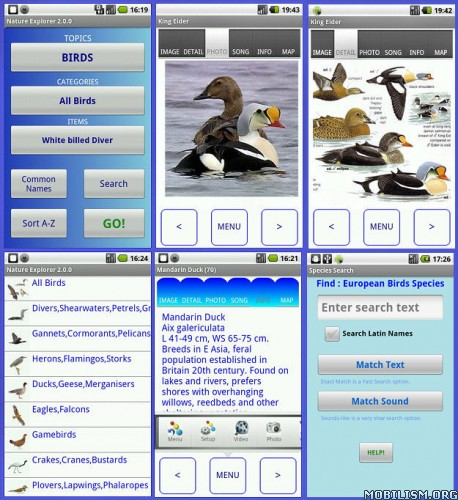
Overview: Nature Explorer for Android has 11 nature topics to view. Each item has an illustration, photograph and text description. Birds also have distribution maps and optional bird songs. Also improved tab usage and wider screen display support. Bird features include bird plumage images. Flowers and Fungi have large detail photograph support. The PC version has a Database Editor.
Image

* Birds (European)
* Butterflies (European)
* Insects
* Marine Life
* Wild Flowers (European)
* Trees
* Fungi
* Reptiles
* Weather
* Fossils
* Rocks
* Birds - extensive features
* Data stored on your SD Card (200mb)
* More support for devices
* Database editor within the Windows version
* Topic Items can sorted A-Z and shown as Latin or common names
* Video and photograph Capture feature to save videos and images from nature
* Search Functions improved
* Bird plumage and Fungi detailed images added and improved
* Menu design with picture icons for each item in list.
* Birders can customize the program for pure birding use!
* New quick strip menu
* Pinch-zoom added to detailed image display
* Slideshow 'auto-scroll' feature added.
* Field Notes with gps location feature
* sd card root & folder path user definition
This app has NO advertisements
More Info:
Software Releases • Polaris Navigation System v 3.41 (navigation package)

Polaris Navigation System
Requirements: Android 2.2+
Overview:
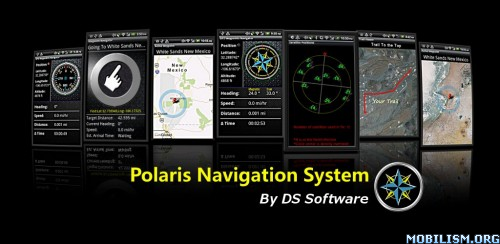
Polaris Navigation System is a complete navigation package for road and off-road navigation
Image


This app has a banner ad with an option to remove ads

More Info:
The Polaris Navigation System package includes:
Reporting on all standard GPS parameters
-Latitude and Longitude
-Altitude
-Speed
Heading (includes magnetic declination correction when in magnet mode)
Odometer
Time en route
Directional compasses (customizable)
Waypoint Management System
-Set waypoints from map, enter coordinates or save current position
-Editable Waypoint Database for storing waypoints
-Waypoint-Finding Compass - A dynamic waypoint-finding tool that always points to your waypoint- just follow the arrow and you'll wind up at your destination!
Maps (street and satellite maps) for setting and viewing waypoints, trails and your position
Trail Management System
Trail Recorder
Editable Trail Database for storing and retrieving trails
Overlay your trail on street or satellite maps
Waypoint Guidance System
-Includes the waypoint-finding compass and reports target coordinates, heading, speed,
Email a map of your position
Get turn-by-turn driving directions from your position or from a specified address or coordinate
Data protection system- your data is backed up regularly meaning you will not lose your progress if you need to change batteries while en-route

gReader Pro (Google Reader) v2.9.7 Apk App


Requirements: Android OS 1.5+

Overview: gReader is an unofficial Google Reader client for Android. Read all your rss/feed news in one place with Google Reader, where keeping up with your favorite websites is as easy as checking your email.

 Pro version:

 - Support developers

 - Ad free version

 - Dark Theme (Night Mode)

 - Medium Widgets

 Features:

Google Reader Synchronization: Use gReader at home, at your offce, or anywhere you go and keep your feeds, tags and shared items synched in one place.

2-Way Sync: Synchronize your read items between gReader and Google Reader. Keep your articles uptodate.

User Interface: Simple, fast and intuitive

Offline Reading: Download and read your articles withour internet connection.

Themes: gReader support Black, Blue and Dark (Pro) Themes

Easy Navigation: Navigate through the articles with intuitice touch gesture.

Folders / Tags: Displaying your feeds in folder and tags

Subscribing: (Un)subscribing your feeds directly in gReader

Auto synchronization: Synchronize your feed automatically for a periodic time

Notification: Keep you update with notification

Sharing: Share your favorite articles with your friends with a simple single-click via Email, Facebook, Twitter, ...

Searching: Let you search for articles in subscriptions

Widget: Adds an Unread Count app widget

Text Mode View: Reduce articles to text-only version. Easy to read.

Inverse Webpage: Inverse the color of the article page

Fullscreen mode: Enlarge your reading space

Editing Subscriptions/Folders: Edit your subscriptions directly in gReader.

People you follow: Folow the feed of your friends

Recommended items / sources: View your recommended items or add recommended sources in gReader

HTTPS connection: Use Http Secure to get your feeds

 What's in this version:

 If you encounter any issues feel free to contact us.

 What's new in v2.9.7

 * Fix: Offline reading issues

 * Fix: Sync issues

 * Improve: List font size also applies to subscription list

 What's new in v2.9.5

 * New: Pinch zoom for Android >= Honeycomb

 * Improve: Sync speed, UI performance

 * Improve: Auto clean offline cache

 * Improve: Auto hide article controls in article view on tablet

 * Change: Remove zoom buttons on tablet

https://play.google.com/store/apps/details?id=com.noinnion.android.greader.readerpro

Download Instructions:
http://ul.to/sbkbe6re

 Mirror:
http://rapidgator.net/file/39830267/g297.apk.html
http://www.HenchFile.com/ena2e65sr8zd

Voodoo Sound Plus v3.1.2.2 Apk App


Requirements: Android 2.1 and up

Overview: This app controls Voodoo sound for Galaxy S, Nexus S phones Galaxy Tab and Asus Transformer running custom kernels implementing Voodoo patches.


 If you don't want or cannot flash a kernel, my commercial app "Voodoo Sound Plus" has the ability to load Voodoo Sound with only root on compatible devices.

 Formely known as "Voodoo Control"

 Root is required.

 Devices supported:

 Honeycomb:

 - Asus EeePadTransformer: 3.0.1 and 3.1

 Gingerbread:

 - Nexus S & Nexus S 4G: Android 2.3.3, 2.3.4 Official Google system and CyanogenMod 7.0.0

 - Galaxy S I9000, I9000B, Captivate, Vibrant: CyanogenMod 7.0.0 - current version

 - Galaxy S I9000: Samsung 2.3.*

 - Korean Galaxy S / Galaxy U / Galaxy K

 - AT&T Captivate: SGH-I897

 - SHW-M130L Galaxy S: SHW-M130L

 - Galaxy Tab International: GT-P1000 and regional variants

 - Galaxy Tab Verizon: SCH-I800

 - Galaxy Tab AT&T: SGH-I987

 - Galaxy Tab Sprint: SPH-P100

 - Galaxy Tab T-Mobile: SGH-T849

 - Galaxy Tab SKT: SHW-M180S

 Froyo:

 - Galaxy S Froyo: GT-I9000 and its regional variants like I9000B, I9000M, I900T

 - AT&T Captivate: SGH-I897

 - AT&T Infuse 4G: SGH-I997

 - Giorgio Armani Galaxy S: GT-I9010

 - Rogers Captivate: SGH-I896

 - T-Mobile Vibrant: SGH-T959

 - T-Mobile GalaxyS 4G: SGH-T959V

 - T-Mobile Exhibit 4G: SGH-T759

 - T-Mobile Sidekick 4G: SGH-T839

 - Verizon Fascinate: SCH-I500

 - Verizon Continuum: SCH-I400

 - Verizon DROID Charge: SCH-I510

 - Telus Fascinate: SGH-T959D

 - Verizon Fascinate: SCH-I500

 - Sprint Epic 4G: SPH-D700

 - MetroPCS Galaxy Indulge: SCH-R910

 - M110S Galaxy S: SHW-M110S

 - SHW-M130L Galaxy U: SHW-M130L

 - SHW-M130K Galaxy K: SHW-M130K

 - DoCoMo SC-02B Galaxy S: SC-02B

 - Galaxy Tab International: GT-P1000 and regional variants

 - Galaxy Tab Verizon: SCH-I800

 - Galaxy Tab AT&T: SGH-I987

 - Galaxy Tab Sprint: SPH-P100

 - Galaxy Tab T-Mobile: SGH-T849

 - Galaxy Tab SKT: SHW-M180S

 Eclair:

 - Galaxy S international, AT&T Captivate, Rogers Captivate, Verizon Continuum, DoCoMo SC-02B, T-Mobile Vibrant, Telus Fascinate, M110S, SHW-M130L, Sprint Epic 4G, Verizon Fascinate

 Galaxy SLC LCD, Galaxy S Plus: GT-I9003 / GT-I9001 is not supported because its hardware platform is entirely different.

 Galaxy Tab Wifi: SGT-P1010 is not supported either for the same reasons.

 Please contact me if the module option behavior is unexpected on any of the device listed here, and also if your device is missing.

 As I publish updates very often, enabling auto-updates is recommended.

 If the program don't work for you, contact me for support or a refund via the email address below.

 Features are auto-detected, extended controls supported will be displayed (it may differ from the screenshots)

 Goal of this project is to:

 - improve sound quality

 - fix audio issues present in Samsung kernels

 - unleash the powerful hi-fi headphone amplifier included in your phone and audiophile-quality DAC.

 Every new feature uses the abilities of Wolfson Microelectronics WM8994 ultra low power audio codec, without affecting battery life.

 Enjoy - and take care of your your hearing, because the amp is a beast

 Notes:

 - When Bass Boost EQ is disabled, signal takes the most direct path and is not processed in any way.

 - It should go without saying but redistribution of this application package is strictly forbidden outside of Google Play.

https://play.google.com/store/apps/details?id=org.projectvoodoo.controlapp

Download:
http://rapidgator.net/file/39816518/...1.2.2.apk.html 
http://www.rapidfileshare.net/u8rko8...1.2.2.apk.html 
http://www.directmirror.com/files/2HFSJUPT

Glass Widgets FULL v2.2.1 Apk App


Requirements: Android OS 2.2 +

Overview: Yet another set of basic home screen widgets.

 This package contains:

 * Glass Clock Widget (with weather)

 * Glass Calendar Widget

 * Glass News Widget (RSS feeds)

 They are designed to provide you with the most important information at a glance, yet still allow you to enjoy the sight of your (Live-) wallpaper. Less is more

 Full version include:

 - Adjust Background Color (and transparency)

 - Adjust Text Color (and transparency)

 What's in this version:

 WEATHER PROBLEM FIXED!

 Google recently closed their 'unofficial' weather service. This caught me unprepared, so I had to scramble to find a replacement weather service.

 As a result, I've now changed the widgets to use World Weather Online for getting weather data.

 v2.2.1 Some small bug fixes. Thanks for the bug reports!

https://market.android.com/details?id=dk.nicolai.buch.andersen.glasswidgets

Download Instructions:
http://www.HenchFile.com/2b8hzybhl6gq

 Mirror:
http://rapidgator.net/file/39820174/g221.zip.html

Wednesday, September 5, 2012

Software Releases • Polaris Navigation System - Free

Polaris Navigation System v 3.41
Requirements: Android 2.2 and up
Cost: Free
Overview:
The Polaris Navigation System is a complete navigation package that includes reporting on all standard GPS parameters, an odometer, altimeter, speedometer and directional compasses. The GPS is backed by a robust waypoint management system for setting and locating your targets and a trail recorder supported by a trail management system. A satellite reporting module shows the location of the GPS satellites relative to your position. Satellite and standard maps for setting waypoints, viewing trails and position are also included. A dynamic waypoint-finding compass will help you navigate to any saved waypoint with certainty while reporting estimated time of arrival, distance to target and other statistics. For road navigation, just enter your destination and get a map with turn-by-turn driving instructions. While navigating, your data is backed up regularly meaning you will not lose your progress should your battery need replacement while en route to your destination. DS Software specializes in mobile navigation tools.

Image


This app is supported by advertisements with an option to upgrade to an ad-free version

More Info:

Software Releases • Smart Launcher Pro v0.9.6s

Smart Launcher Pro v0.9.6s
Requirements: Android 2.1 and up
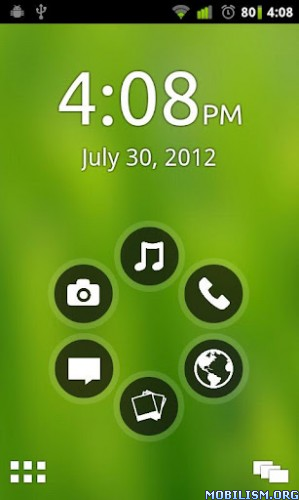
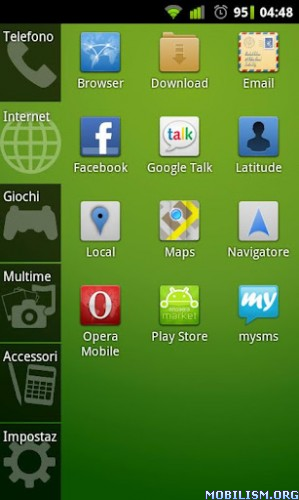
Overview: Smart Launcher is an innovative launcher characterized by a minimalist design, low memory usage and an user-friendly UI that let you start any application with a few taps.

Image

Image Image

It is currently the only launcher on the store to features automatic cataloging of installed apps!

This is the first version :)

Features:
- Main screen with Quick Start
- Drawer organized by categories
- Ready to use without special configurations.
- Support for Live Wallpaper and screens of different sizes.
- Support of set of icons for Launcher Pro and ADW Launcher

What's in this version:
0.8.22
Widget bugfix;
Asyncrone icon loading (drawer is faster);
SPANISH support!

This app has NO advertisements

More Info:
Organizer Widget v1.1.8.1

Organizer Widget v1.1.8.1
Requirements: Android: 2.1 and up
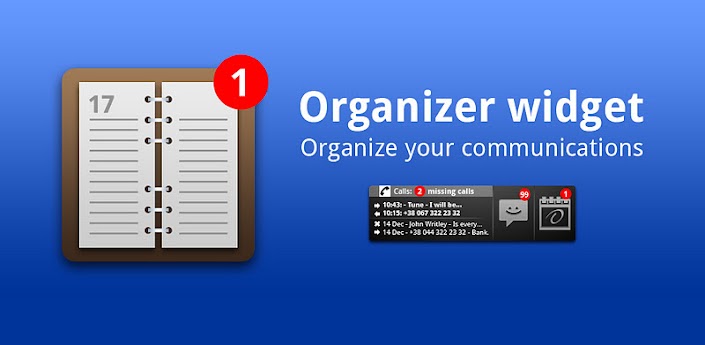
Overview: Organizer Widget: Organize your communications.

This application was awarded by HTC as absolute winner in Android Developers Contest in Ukraine. Link (Ukrainian): http://dou.ua/lenta/news/htc-android...est-2-summary/


[break]

Organizer widget displays information of last and unanswered calls, new SMS, tasks and events defined in Calendar in one panel. Unanswered calls, new sms and Events for nearest 24 hours are marked with special icons and are summarized in red circle per group. On clicking Calls, SMS or Calendar icons you go to standard applications – Contacts, Send SMS and Calendar.

How to install the widget:

1. Go to home screen

2. Long touch the screen (2 seconds)

3. Choose Widgets

4. Choose Organizer Widget

When install you have option to choose the background (Black or Transparent) and scheme (Color or Black&White).

-----------

We have been informed that some users has problems with running this application on Samsung Note with ICS. Unfortunately we were unable to reproduce this problem. Please contact us by email google-developer@2kgroup.com if you meet this problem. Thanks!

-----------

*** PLEASE EMAIL US PROBLEMS/QUESTIONS/SUGGESTIONS, WE WILL HELP YOU, WE CANNOT PHYSICALLY RESPOND TO ANY COMMENTS ***

-----------

We added the ability to advise new features and voting - so we know what features you most like to have in next releases: http://www.facebook.com/pages/Organi...37704459590371

-----------

Please let us know to support e-mail what language you would see added to a list of supported and/or if you can help with localization or testing of localization.

-----------

History:

1.0.7

Fixed: calculation of a date for all-day event.

1.1.1

Added: New color scheme

Added: Ability to configure the font size

Added: Option to reset unanswered calls with just clicking on Widget

1.1.2

Added: Calendar icon displays current date

Fixed: Lunch crash on Galaxy Tab

Changed: Small changes in German localization

Fixed: Date format issue for HTC phones

1.1.3

Fixed: Events are read only from enabled calendars

Changed: Korean translation was corrected. Many thanks to Diane from Korea for help!

Added: Polish localization. Thanks to Krzysztof from Poland!

Added: it is possible to change language or allow to system to detect current one. Before language was selected automatically.

1.1.4

Added: user can configure third-party sms readers (for example GO SMS), calendar applications

Added: new languages were added: Arabic, Czech (thanks to JirĂ­ Martin!), Hebrew

1.1.5

Added: possibility to choose tabs to be displayed (Calls, SMS, Calendar)

Added: Slovenian, Croatian, Serbian languages. Thanks to Denis Tomasevic!

Changed: Now Calendar show notifications for coming tasks only for current day. Before it displays for coming 24 hours.

1.1.6

Fixed: Calendar didn't work in Android 4.0

1.1.7

Fixed: ACalendar now available in a list of calendar apps

Fixed: Sometimes saving options didn't work.

Fixed: Crash on empty events (on some phone models)

Fixed: Crash in Android 4

1.1.7.1

Fixed: Saving calendar options when add a widget to desktop

1.1.8

Fixed: Calculating active events for today

Changes: Improved battery usage.

1.1.8.1

Fixed: Fix for Samsung Galaxy 2 run on ICS (Android 4)

More Info:


Code:

https://play.google.com/store/apps/details?id=com.alarmspider.organizer


Download Instructions:
http://www.filecloud.ws/622xgbsiyu4b

Super Status Bar v0.16.0.1

Super Status Bar v0.16.0.1
Requirements: Android: 2.1 and up
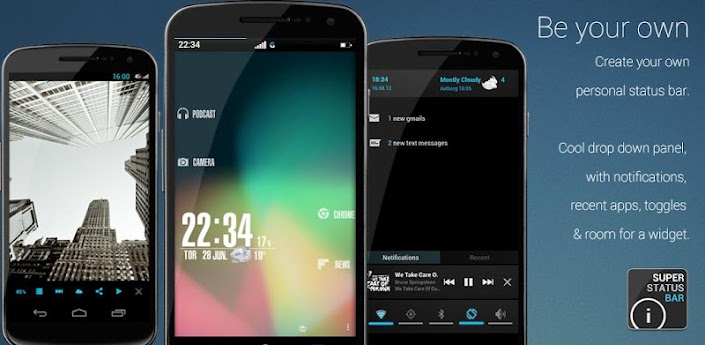
Overview: Customize, potency and make more beautiful your boring status bar

NOW SUPPORT DOWNLOADABLE THEMES

CREATE YOUR OWN AND SHARE IT ON GooglePlay: bit.ly/OL8Cmk

At last a bar and a custom notification panel to suit the user!

And without losing features!


[break]

Super Status Bar is the notification bar you always wanted.

Not a Root? because there is no problem, Super Status Bar is here to change things!Customize your taskbar to the smallest detail!

With Super Status Bar can change the position of the icons in the status bar, you can change your appearance, use the backgrounds that you like, download new themes each week, change the text fonts, simplify your status bar to a minimum expression or extend it until the unimaginable features, all to make your status bar to your liking and not liking the manufacturer.

Choose from a large number of themes and also ... be the first to test the status bar ICE CREAM SANDWICH!

You can see the notifications on the lock screen or even while you play!

You only have to activate Accessibility options Android

Now you can customize the notifications panel!

You'll also have quick access to the most important system notifications without having to deploy the notification bar, with direct access included in the application, such as calls, sms's or gmail's

And if this were not enough, you can enjoy the new notifications panel which add more features to the classic status bar, things like shortcuts to switch wi-fi, bluetooth, gps, mute and more.

Better and more complete than statusbar+ or omega statusbar

This app is in beta, please used the comments to suggest improvements and not rate adversely.

If you have a problem used aid included in the app and if you find no solution send me an e-mail

ATENTION:

SDCARD is required to save settings & background

NOTE:

The logs are read only to send the FC that may cause by the app.

I DO NOT PICK UP PRIVATE USER DATA!

More Info:


Code:

https://play.google.com/store/apps/details?id=com.firezenk.ssb&hl=en


Download Instructions:
http://www.filecloud.ws/8ou3q83jm3ci